Wednesday, March 28, 2018

VirtualBox: The Updated Problem

There was a problem with Monday's updates for Virtualbox on Linux Mint.
Once installed, they blew things up rather violently, depending on your setup, you could either end up with a box that couldn't login (via the graphical login manager) or (my case) with a box that wasn't able to run programs.
Right after installing this update on the MacBook Pro programs (some of them, not every single one) refused to load, and those that didn't they didn't even produce an error message, really annoying, right?

In the end, the fix for the update shenanigans was pretty easy to do, but the really cool thing is that Linux Mint released a fix for this update right the same day.

Labels: , , , , , , ,

Sunday, October 25, 2015

Virtualbox: Kernel driver not installed (rc=1808)

The dreaded error, and the subsequent failure that prevents Virtualbox to start the guest OS.
When I did a:

sudo /etc/init.d/vboxdrv setup

I got:

sudo: /etc/init.d/vboxdrv: command not found

On a 32 bit plain vanilla Linux Mint (XFCE) install, I had to do this:

sudo apt-get install virtualbox-dkms

Then, again, after installing that, if I issued a:

 sudo /etc/init.d/vboxdrv setup

I got the same error than before and of course, VirtualBox failed to start the guest...
What I did was:

sudo modprobe vboxdrv

After that, I was able to boot the guest OS, but issuing a;

sudo /etc/init.d/vboxdrv setup

Still failed.


Labels: , , , , ,

Monday, August 26, 2013

Empowering Krull - VirtualBox

After the HDD maxification on Krull, I had to push up the kernel version (to get rid of the ramdom laptops hangs), and then install VirtualBox according to that kernel version as well.
First off, get the VirtualBox that is installed by default on Linux Mint, at least on Cinnamon (64 bits).

krull > dpkg-query -W | egrep '(virtualbox*)'
virtualbox-guest-dkms 4.1.12-dfsg-2ubuntu0.3
virtualbox-guest-utils 4.1.12-dfsg-2ubuntu0.3
virtualbox-guest-x11 4.1.12-dfsg-2ubuntu0.3

So those are the packages that I have to delete, in order to install my newer VirtualBox.
To delete those I did:

krull > sudo apt-get remove virtualbox-\*
Reading package lists... Done
Building dependency tree       
Reading state information... Done
Note, selecting 'virtualbox-guest-source' for regex 'virtualbox-*'
Note, selecting 'virtualbox-nonfree' for regex 'virtualbox-*'
Note, selecting 'virtualbox-guest-utils' for regex 'virtualbox-*'
Note, selecting 'virtualbox' for regex 'virtualbox-*'
Note, selecting 'virtualbox-ose-dbg' for regex 'virtualbox-*'
Note, selecting 'virtualbox-ose-source' for regex 'virtualbox-*'
Note, selecting 'virtualbox-dkms' for regex 'virtualbox-*'
Note, selecting 'virtualbox-ose-guest-dkms' for regex 'virtualbox-*'
Note, selecting 'virtualbox-dbg' for regex 'virtualbox-*'
Note, selecting 'virtualbox-guest-x11' for regex 'virtualbox-*'
Note, selecting 'virtualbox-ose-dkms' for regex 'virtualbox-*'
Note, selecting 'virtualbox-ose-qt' for regex 'virtualbox-*'
Note, selecting 'virtualbox-guest-additions-iso' for regex 'virtualbox-*'
Note, selecting 'virtualbox-ose-guest-source' for regex 'virtualbox-*'
Note, selecting 'virtualbox-fuse' for regex 'virtualbox-*'
Note, selecting 'virtualbox-ose' for regex 'virtualbox-*'
Note, selecting 'virtualbox-2.0' for regex 'virtualbox-*'
Note, selecting 'virtualbox-2.1' for regex 'virtualbox-*'
Note, selecting 'virtualbox-2.2' for regex 'virtualbox-*'
Note, selecting 'virtualbox-3.0' for regex 'virtualbox-*'
Note, selecting 'virtualbox-3.1' for regex 'virtualbox-*'
Note, selecting 'virtualbox-3.2' for regex 'virtualbox-*'
Note, selecting 'virtualbox-4.0' for regex 'virtualbox-*'
Note, selecting 'virtualbox-4.1' for regex 'virtualbox-*'
Note, selecting 'virtualbox-qt' for regex 'virtualbox-*'
Note, selecting 'virtualbox-ose-fuse' for regex 'virtualbox-*'
Note, selecting 'virtualbox-guest-dkms' for regex 'virtualbox-*'
Note, selecting 'virtualbox-ose-guest-utils' for regex 'virtualbox-*'
Note, selecting 'virtualbox-ose-guest-x11' for regex 'virtualbox-*'
Note, selecting 'virtualbox-guest-additions' for regex 'virtualbox-*'
Note, selecting 'virtualbox-source' for regex 'virtualbox-*'
Package virtualbox-nonfree is not installed, so not removed
Package virtualbox-4.1 is not installed, so not removed
Package virtualbox-guest-additions is not installed, so not removed
Package virtualbox-guest-additions-iso is not installed, so not removed
Package virtualbox is not installed, so not removed
Package virtualbox-dbg is not installed, so not removed
Package virtualbox-dkms is not installed, so not removed
Package virtualbox-fuse is not installed, so not removed
Package virtualbox-guest-source is not installed, so not removed
Package virtualbox-ose is not installed, so not removed
Package virtualbox-ose-dbg is not installed, so not removed
Package virtualbox-ose-dkms is not installed, so not removed
Package virtualbox-ose-fuse is not installed, so not removed
Package virtualbox-ose-guest-dkms is not installed, so not removed
Package virtualbox-ose-guest-source is not installed, so not removed
Package virtualbox-ose-guest-utils is not installed, so not removed
Package virtualbox-ose-guest-x11 is not installed, so not removed
Package virtualbox-ose-qt is not installed, so not removed
Package virtualbox-ose-source is not installed, so not removed
Package virtualbox-qt is not installed, so not removed
Package virtualbox-source is not installed, so not removed
The following packages will be REMOVED:
  virtualbox-guest-dkms virtualbox-guest-utils virtualbox-guest-x11
0 upgraded, 0 newly installed, 3 to remove and 0 not upgraded.
After this operation, 10.4 MB disk space will be freed.
Do you want to continue [Y/n]? Y
(Reading database ... 208943 files and directories currently installed.)
Removing virtualbox-guest-dkms ...

-------- Uninstall Beginning --------
Module:  virtualbox-guest
Version: 4.1.12
Kernel:  3.2.0-23-generic (x86_64)
-------------------------------------

Status: Before uninstall, this module version was ACTIVE on this kernel.

vboxguest.ko:
 - Uninstallation
   - Deleting from: /lib/modules/3.2.0-23-generic/
 - Original module
   - No original module was found for this module on this kernel.
   - Use the dkms install command to reinstall any previous module version.


vboxsf.ko:
 - Uninstallation
   - Deleting from: /lib/modules/3.2.0-23-generic/
 - Original module
   - No original module was found for this module on this kernel.
   - Use the dkms install command to reinstall any previous module version.


vboxvideo.ko:
 - Uninstallation
   - Deleting from: /lib/modules/3.2.0-23-generic/
 - Original module
   - No original module was found for this module on this kernel.
   - Use the dkms install command to reinstall any previous module version.

depmod....

DKMS: uninstall completed.

-------- Uninstall Beginning --------
Module:  virtualbox-guest
Version: 4.1.12
Kernel:  3.2.0-52-generic (x86_64)
-------------------------------------

Status: Before uninstall, this module version was ACTIVE on this kernel.

vboxguest.ko:
 - Uninstallation
   - Deleting from: /lib/modules/3.2.0-52-generic/updates/
 - Original module
   - No original module was found for this module on this kernel.
   - Use the dkms install command to reinstall any previous module version.


vboxsf.ko:
 - Uninstallation
   - Deleting from: /lib/modules/3.2.0-52-generic/updates/
 - Original module
   - No original module was found for this module on this kernel.
   - Use the dkms install command to reinstall any previous module version.


vboxvideo.ko:
 - Uninstallation
   - Deleting from: /lib/modules/3.2.0-52-generic/updates/
 - Original module
   - No original module was found for this module on this kernel.
   - Use the dkms install command to reinstall any previous module version.

depmod....

DKMS: uninstall completed.

------------------------------
Deleting module version: 4.1.12
completely from the DKMS tree.
------------------------------
Done.
Removing virtualbox-guest-x11 ...
Removing virtualbox-guest-utils ...
Processing triggers for man-db ...
Processing triggers for ureadahead ...

And then, installed the version of VirtualBox that I need for this kernel, using a *.deb package.

krull > sudo dpkg -i virtualbox-4.2_4.2.16-86992~Ubuntu~raring_amd64.deb 
Selecting previously unselected package virtualbox-4.2.
(Reading database ... 208674 files and directories currently installed.)
Unpacking virtualbox-4.2 (from virtualbox-4.2_4.2.16-86992~Ubuntu~raring_amd64.deb) ...
Setting up virtualbox-4.2 (4.2.16-86992~Ubuntu~raring) ...
Adding group `vboxusers' (GID 129) ...
Done.
 * Stopping VirtualBox kernel modules                                                                                                                      [ OK ] 
 * Uninstalling old VirtualBox DKMS kernel modules                                                                                                         [ OK ] 
 * Trying to register the VirtualBox kernel modules using DKMS                                                                                             [ OK ] 
 * Starting VirtualBox kernel modules                                                                                                                      [ OK ] 
Processing triggers for ureadahead ...
Processing triggers for shared-mime-info ...
Processing triggers for desktop-file-utils ...
Processing triggers for bamfdaemon ...
Rebuilding /usr/share/applications/bamf.index...
Processing triggers for gnome-menus ...
Processing triggers for hicolor-icon-theme ...
Processing triggers for python-central ...


Labels: , , , , ,

Sunday, July 14, 2013

Kernel bump & VirtualBox


Last Wednesday updated the kernel from the 3.2 branch all the way to 3.9.

I was fed up with the occasional hangs and the problems shutting down my T430 lappie.

So far things are really good... Did a 3 day up test, with many, many Suspends, and had no problem at all.
The only thing -and it was actually something to be expected- that did not work after the kernel upgrade was VirtualBox, it even belched an error message while the actual kernel was being installed.
So, after dabbling a bit with some Google & different tips, in the end decided to simply uninstall Precise Pangolin's stock VirtualBox and then install the Raring one form the VirtualBox website.
It works flawlessly.

Labels: , , , ,

Sunday, April 07, 2013

VT-x features locked or unavailable in MSR

If you get this error message, and you Virtual Box machine fails to start, simply enable the virtualization support of your box (the real one that is) on the BIOS.

Failed to open a session for the virtual machine XXXXXXXXXX.

VT-x features locked or unavailable in MSR. (VERR_VMX_MSR_LOCKED_OR_DISABLED).

Result Code: NS_ERROR_FAILURE (0x80004005)
Component: Console
Interface: IConsole {1968b7d3-e3bf-4ceb-99e0-cb7c913317bb}


Labels: , , , , ,

Saturday, June 30, 2012

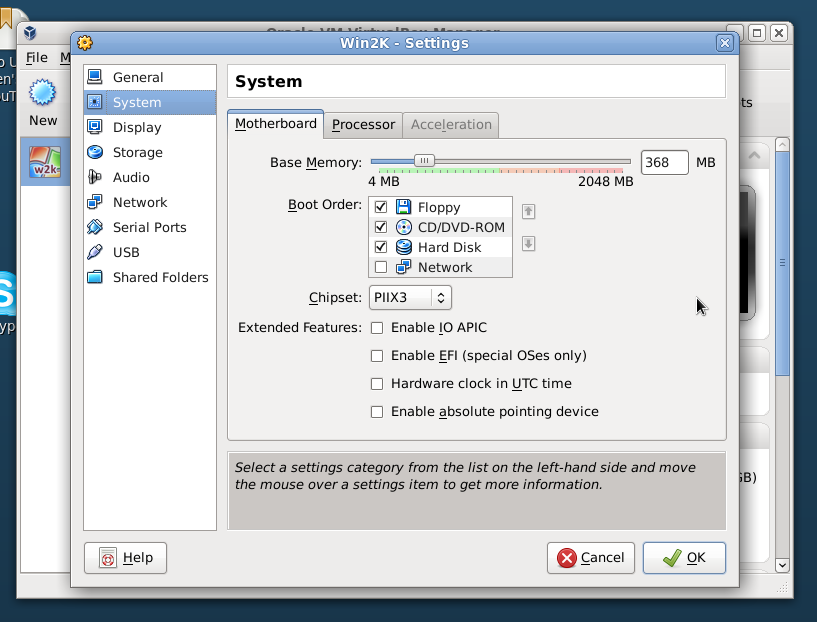
VirtualBox on Scientific Linux


Installed it yesterday and copied my battered but always faithful Win2K vdi image.
Basically it was following the instructions here:
Install VirtualBox on CentOS / Scientific Linux

Everything went Ok, but I had to make two changes on the settings to make it work on my T43.
The first one was to disable IOAPIC to make it actually boot (the screenshot above) the other one was to set the network to NAT (even tho the Win2K adapter has and always had a fixed IP address).


$ sudo yum install dkms
$ sudo wget -P /etc/yum.repos.d http://download.virtualbox.org/virtualbox/rpm/rhel/virtualbox.repo
$ sudo yum install VirtualBox-4.1
$ sudo usermod -a -G vboxusers your_user_name

Labels: , , , ,

Saturday, September 17, 2011

Sojourner got it's VirtualBox


The trusty Win2K VirtualBox image that I've been hauling from box to box for over a two year period got it first usage with the T60, Sojourner's current incarnation.
Other than a little glitch with the network interface upon booting -and easily resolved by visiting the Settings > Network page- everything works A Ok.

Labels: , , , ,

Saturday, August 13, 2011

Ubuntu: Transfer VirtualBox image to other box


A very quick roundup on the steps I took to copy my battered Window 2000 Pro VirtualBox image from Linux box to Linux box, being doing so for quite a now without a single problem.

First off, copy the vdi file (or files) from:
/home/USERNAME/.VirtualBox/HardDisks/
On my case, it is the file "Win2K.vdi" to the same directory on the other box.
The same goes for the xml file (or files) on:
/home/USERNAME/.VirtualBox/Machines/Win2K/

- Open VirtualBox
- A warning about missing Guest Additions, copy the iso file to
/usr/share/virtualbox/

- Open VirtualBox, this time, no warning at all
- Start the virtual machine
- A warning about the NIC card because of the transfer, close it.
- Open VirtualBox, problem gone, start using it...

Labels: , , ,

Monday, June 13, 2011

VirtualBox annoyances (yes, the Trisquel thing goes on...)

Yesterday tried to create a quick VirtualBox image on Sojourner in order to be able to -finally- get those icons and the wallpaper...

Found out, totally by accident, that there is a bug with VirtualBox and the EXT4 file system... This says a lot about how much virtualization I use... Actually, I use it quite a lot, but I mostly drag the same Windows 2000 Pro vdi image from box to box (and OS to OS) for over a two year now, talk about portability :)

In the end, had to create that VirtualBox image on Trantor, and then remove the icons, BTW, they weren't that spectacular, but I like the wallpaper, specially the blue one, a definitive keep.

A couple of screenshots from the process:


Labels: , , , , , , , ,

Wednesday, June 16, 2010

Lucid on the Thinkpad T43 (II)


Found a glitch, luckily it was a breeze to work it out.

The VirtualBox image of Windows 2000 refused to boot after the dist-upgrade, throwing the error message on the screenshot, but, after recompiling the kernel modules -like the same screenshot suggested- the image booted just fine.
Will keep posting if any other problem arises, particularly on this first day of use.

Labels: , , , , , ,

Thursday, May 27, 2010

No updates for you!


Cool looking -and slightly menacing as well- icon informing that there are problem with your Ubuntu updates.
This is a new one for me, haven't seeing it before, the trigger of this is the VirtualBox updates, apparently there is a problem with the updates, since there is a new version available or similar.

Labels: , , , , ,

Sunday, March 28, 2010

Lucid on a VM


Installed Lucid on a VM on Tango to give it a spin.

I think Tango is getting really old, and with a small share of hardware problems nowadays... The CD ROM hardly works, to begin with...

The VirtualMachine on Tango is 3 GB in size and 512 of RAM, and the whole thing it was simply SWAP time fest..

Labels: , , , , ,

Sunday, March 14, 2010

Installing Virtualbox on a headless server

Had to install VirtualBox in a jiffy on a server, a totally quick and dirty thing to get a couple of things tested. The CentOS server in question did not had an internet connection, so all the RPM packages I wgeted are downloaded to another box, and rsynced to the CentOS server for installation.

Here are the steps I took...
The CentOS server was running:

CentOS release 4.2 (Final)
Linux centosserver.something.something 2.6.9-22.0.2.ELsmp #1 SMP Tue Jan 17 07:10:04 CST 2006 i686 i686 i386 GNU/Linux

First off, the VirtualBox dependency:

# rpm -ivh xorg-x11-Mesa-libGLU-6.8.2-1.EL.13.20.i386.rpm SDL-1.2.7-8.i386.rpm
Preparing... ########################################### [100%]
1:SDL ########################################### [ 50%]
2:xorg-x11-Mesa-libGLU ########################################### [100%]

And then, the VirtualBox package itself:

# rpm -ivh VirtualBox-3.1-3.1.4_57640_rhel4-1.i386.rpm
warning: only V3 signatures can be verified, skipping V4 signature
Preparing... ########################################### [100%]
1:VirtualBox-3.1 ########################################### [100%]
warning: only V3 signatures can be verified, skipping V4 signature

Creating group 'vboxusers'. VM users must be member of that group!

No precompiled module for this kernel found -- trying to build one. Messages
emitted during module compilation will be logged to /var/log/vbox-install.log.

Success!

Add a regular user to the vboxuser group:
usermod -G vboxusers regular.user.who.can.use.virtualbox

The test does not work at all (as expected, actually):

$ VirtualBox &
[1] 31929
$ Failed to open the X11 display!

So, onto to install a X11 working environment:

# rpm --test -ivh xorg-x11-tools-6.8.2-1.EL.13.20.i386.rpm xorg-x11-xauth-6.8.2-1.EL.13.20.i386.rpm
error: Failed dependencies:
xorg-x11 is needed by xorg-x11-tools-6.8.2-1.EL.13.20.i386
Suggested resolutions:
xorg-x11-6.8.2-1.EL.13.20.i386.rpm

# rpm --test -ivh xorg-x11-6.8.2-1.EL.13.20.i386.rpm
error: Failed dependencies:
/usr/X11R6/bin/mkfontdir is needed by xorg-x11-6.8.2-1.EL.13.20.i386
/usr/X11R6/bin/xauth is needed by xorg-x11-6.8.2-1.EL.13.20.i386
/usr/sbin/chkfontpath is needed by xorg-x11-6.8.2-1.EL.13.20.i386
base-fonts is needed by xorg-x11-6.8.2-1.EL.13.20.i386
xinitrc is needed by xorg-x11-6.8.2-1.EL.13.20.i386
xorg-x11-xfs = 6.8.2-1.EL.13.20 is needed by xorg-x11-6.8.2-1.EL.13.20.i386
Suggested resolutions:
chkfontpath-1.10.0-2.i386.rpm
fonts-xorg-base-6.8.1.1-1.EL.1.noarch.rpm
xinitrc-4.0.14-1.noarch.rpm
xorg-x11-font-utils-6.8.2-1.EL.13.20.i386.rpm
xorg-x11-xfs-6.8.2-1.EL.13.20.i386.rpm

wget http://vault.centos.org/4.2/os/i386/CentOS/RPMS/chkfontpath-1.10.0-2.i386.rpm && \
wget http://vault.centos.org/4.2/os/i386/CentOS/RPMS/fonts-xorg-base-6.8.1.1-1.EL.1.noarch.rpm && \
wget http://vault.centos.org/4.2/os/i386/CentOS/RPMS/xinitrc-4.0.14-1.noarch.rpm && \
wget http://vault.centos.org/4.2/os/i386/CentOS/RPMS/xorg-x11-font-utils-6.8.2-1.EL.13.20.i386.rpm && \
wget http://vault.centos.org/4.2/os/i386/CentOS/RPMS/xorg-x11-xfs-6.8.2-1.EL.13.20.i386.rpm

chkfontpath-1.10.0-2.i386.rpm fonts-xorg-base-6.8.1.1-1.EL.1.noarch.rpm xinitrc-4.0.14-1.noarch.rpm xorg-x11-font-utils-6.8.2-1.EL.13.20.i386.rpm xorg-x11-xfs-6.8.2-1.EL.13.20.i386.rpm

# rpm --test -ivh chkfontpath-1.10.0-2.i386.rpm fonts-xorg-base-6.8.1.1-1.EL.1.noarch.rpm xinitrc-4.0.14-1.noarch.rpm xorg-x11-6.8.2-1.EL.13.20.i386.rpm xorg-x11-font-utils-6.8.2-1.EL.13.20.i386.rpm xorg-x11-tools-6.8.2-1.EL.13.20.i386.rpm xorg-x11-xauth-6.8.2-1.EL.13.20.i386.rpm xorg-x11-xfs-6.8.2-1.EL.13.20.i386.rpm
error: Failed dependencies:
switchdesk >= 3.7 is needed by xinitrc-4.0.14-1.noarch
/usr/bin/ttmkfdir is needed by xorg-x11-xfs-6.8.2-1.EL.13.20.i386
Suggested resolutions:
switchdesk-4.0.6-3.noarch.rpm
ttmkfdir-3.0.9-14.1.EL.i386.rpm


wget http://vault.centos.org/4.2/os/i386/CentOS/RPMS/switchdesk-4.0.6-3.noarch.rpm && \
wget http://vault.centos.org/4.2/os/i386/CentOS/RPMS/ttmkfdir-3.0.9-14.1.EL.i386.rpm

# rpm -ivh chkfontpath-1.10.0-2.i386.rpm fonts-xorg-base-6.8.1.1-1.EL.1.noarch.rpm xinitrc-4.0.14-1.noarch.rpm xorg-x11-6.8.2-1.EL.13.20.i386.rpm xorg-x11-font-utils-6.8.2-1.EL.13.20.i386.rpm xorg-x11-tools-6.8.2-1.EL.13.20.i386.rpm xorg-x11-xauth-6.8.2-1.EL.13.20.i386.rpm xorg-x11-xfs-6.8.2-1.EL.13.20.i386.rpm switchdesk-4.0.6-3.noarch.rpm ttmkfdir-3.0.9-14.1.EL.i386.rpmPreparing... ########################################### [100%]
1:xorg-x11-font-utils ########################################### [ 10%]
2:ttmkfdir ########################################### [ 20%]
3:xorg-x11-xfs ########################################### [ 30%]
4:chkfontpath ########################################### [ 40%]
5:fonts-xorg-base ########################################### [ 50%]
6:switchdesk ########################################### [ 60%]
7:xorg-x11-xauth ########################################### [ 70%]
8:xorg-x11 ########################################### [ 80%]
9:xinitrc ########################################### [ 90%]
10:xorg-x11-tools ########################################### [100%]

Labels: , , , ,

Sunday, March 07, 2010

VirtualBox on Karmic

Installed it yesterday, for testing some stuff on a Windows 2000 Pro host.
Tried using the stock one from the Ubuntu repos, but, it didn't work for me, maybe I was doing something wrong...

$ sudo aptitude install virtualbox-3.0
[sudo] password for esteban:
Reading package lists... Done
Building dependency tree
Reading state information... Done
Reading extended state information
Initializing package states... Done
No candidate version found for virtualbox-3.0
No packages will be installed, upgraded, or removed.
0 packages upgraded, 0 newly installed, 0 to remove and 5 not upgraded.
Need to get 0B of archives. After unpacking 0B will be used.
Writing extended state information... Done
Reading package lists... Done
Building dependency tree
Reading state information... Done
Reading extended state information
Initializing package states... Done

So I head for the source VirtualBox downloads, and followed the instructions provided, and in less than 30 minutes I got the whole thing up & working...
First off, added the entry to my repos list:

$ sudo emacs /etc/apt/sources.list

Added this at the very end of file:

deb http://download.virtualbox.org/virtualbox/debian karmic non-free

Then, downloaded and imported the key:

$ sudo apt-key add sun_vbox.asc

And, after all that, refreshed the list:

$ sudo aptitude update

After that, it was a simple installation:

$ sudo aptitude install virtualbox-3.1
Reading package lists... Done
Building dependency tree
Reading state information... Done
Reading extended state information
Initializing package states... Done
The following NEW packages will be installed:
dkms{a} fakeroot{a} libqt4-network{a} libqt4-opengl{a} libsdl-ttf2.0-0{a} patch{a} virtualbox-3.1
0 packages upgraded, 7 newly installed, 0 to remove and 5 not upgraded.
Need to get 45.6MB of archives. After unpacking 91.4MB will be used.
Do you want to continue? [Y/n/?]

Processing triggers for ureadahead ...
Processing triggers for desktop-file-utils ...
Processing triggers for man-db ...
Setting up libqt4-network (4.5.3really4.5.2-0ubuntu1) ...

Setting up libqt4-opengl (4.5.3really4.5.2-0ubuntu1) ...

Setting up virtualbox-3.1 (3.1.4-57640_Ubuntu_karmic) ...
Adding group `vboxusers' (GID 122) ...
Done.
Messages emitted during module compilation will be logged to /var/log/vbox-install.log.
Success!
* Starting VirtualBox kernel module * done.

Setting up dkms (2.1.0.1-0ubuntu1) ...
* Running DKMS auto installation service for kernel 2.6.31-19-generic * vboxdrv (3.1.4)... [ OK ]
* vboxnetadp (3.1.4)... [ OK ]
* vboxnetflt (3.1.4)... [ OK ]

Setting up fakeroot (1.12.4ubuntu1) ...
update-alternatives: using /usr/bin/fakeroot-sysv to provide /usr/bin/fakeroot (fakeroot) in auto mode.

Setting up libsdl-ttf2.0-0 (2.0.9-1build1) ...

Setting up patch (2.5.9-5) ...
Processing triggers for libc-bin ...
ldconfig deferred processing now taking place
Reading package lists... Done
Building dependency tree
Reading state information... Done
Reading extended state information
Initializing package states... Done
Writing extended state information... Done

Labels: , , , , ,