Thursday, May 27, 2010

No updates for you!


Cool looking -and slightly menacing as well- icon informing that there are problem with your Ubuntu updates.
This is a new one for me, haven't seeing it before, the trigger of this is the VirtualBox updates, apparently there is a problem with the updates, since there is a new version available or similar.

Labels: , , , , ,

Monday, May 17, 2010

The current Ubuntu desktop

It's been a while, yes... But Oesediez still stands ;)

Labels: , , , , ,

Monday, May 03, 2010

An amazing uptime

Yes, I know, I tend to repeat myself, but I'm truly shocked at this uptime, for a Ubuntu box, a Ubuntu laptop specifically, I find it really amazing.

$ uptime
00:31:12 up 46 days, 21:44, 3 users, load average: 0.57, 0.56, 0.34

Had to postpone a bit the kernel update I linked above, the Canonical server were hammered with Lucid downloads, and getting anything from them was a nightmare... So, the uptime kept actually raising! Until now! Reboot!

Labels: , , , ,

Friday, April 30, 2010

Amazing Ubuntu Uptime


I honestly can't remember an uptime on my Ubuntu workstations or laptops that has reached this high, pretty sure it was due to the fact that most of the folks at Canonical might have been with their hands full with the Lucid Lynx release.

Labels: , , , , ,

Sunday, April 18, 2010

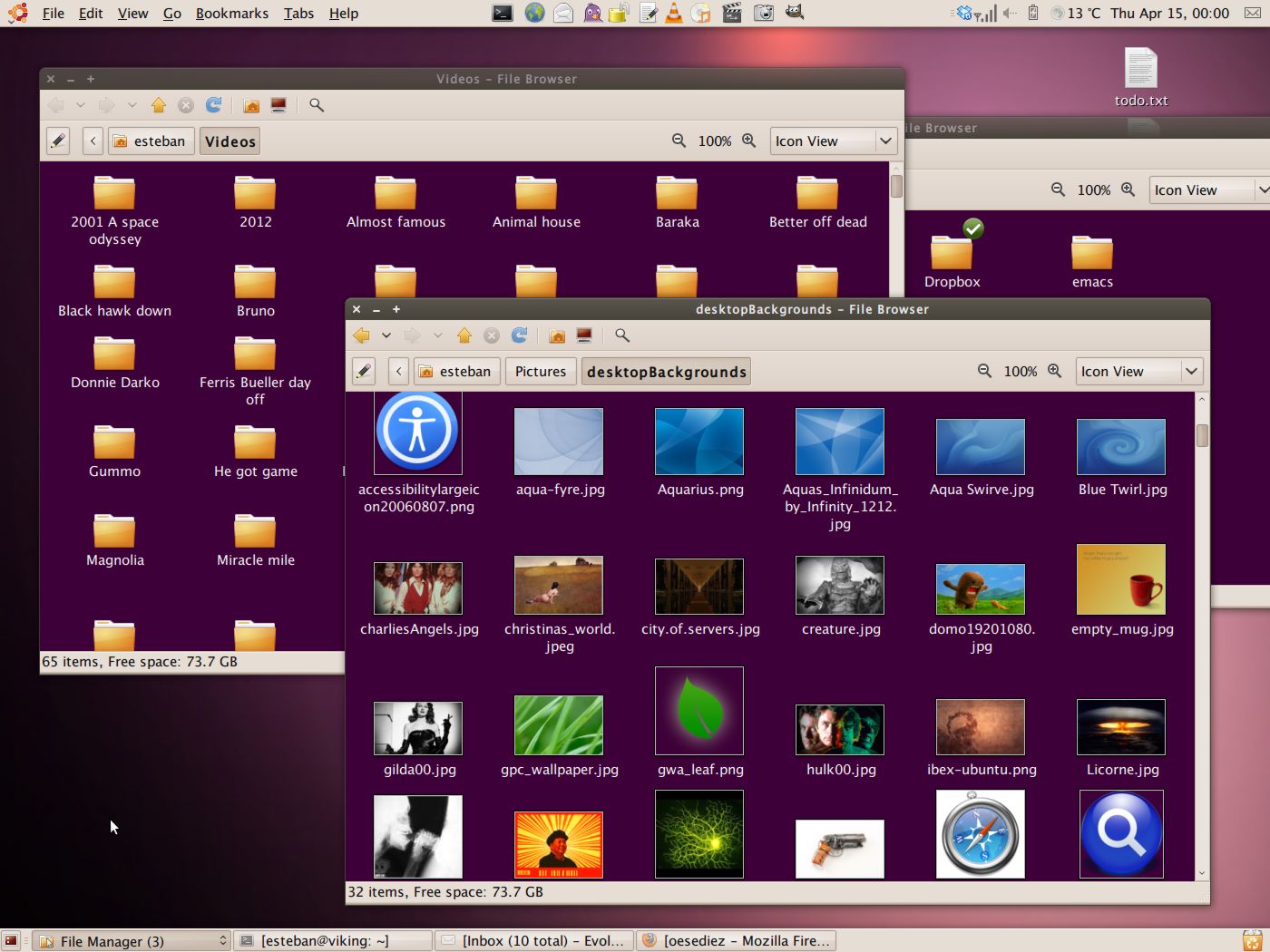
The current Ubuntu theme

Been buried by work this week, not much free time to post anything on my beloved Oesediez I'm afraid...
The screenshot shows that it is pretty obvious that I still have that Lucid Lynx fetish (link 1 link 2 link 3) going on...

Labels: , , , , ,

Tuesday, March 30, 2010

A magnificent update


Well, well, well...
Take a look at who got an update, no other than the mighty mighty Emacs!
This shitty and totally exhausting day got a bit of a reward in the end, it seems, not, after the install, Emacs launches even faster on my Thinkpad.

(BTW, this is totally a Pro Emacs blog, if you haven't noticed yet...)

Labels: , , , , ,

Sunday, March 28, 2010

Lucid on a VM


Installed Lucid on a VM on Tango to give it a spin.

I think Tango is getting really old, and with a small share of hardware problems nowadays... The CD ROM hardly works, to begin with...

The VirtualMachine on Tango is 3 GB in size and 512 of RAM, and the whole thing it was simply SWAP time fest..

Labels: , , , , ,

Thursday, March 25, 2010

Option-less Global Menu


I'm a great fan of Global Menu, not only for the Os X root (bah, the Apple root really) but also because it saves a lot of screen real state, something that in my experience, you can never have enough of it.

Now, I've noticed that right after you install it (or after disabling and enabling once again after the initial installation) it offers no options at all, just like on the screenshot above.

The solution I'm using at the moment, far from perfect, is to logout, and back in right after enabling it, it fixes the whole thing in a jiffy.

Labels: , , , ,

Wednesday, March 24, 2010

19" of Gnome glory!


Attached my trusty and old Samsung monitor, a SyncMaster 920NW, to the Thinkpad.

Everything worked like a charm, right from the get go... I'm using it as the main monitor, switching off the Thinkpad's own LCD.
Yep, the Thinkpad's keyboard it is a incredible pleasure to use, but the poor little beast gets unbearably hot for my taste.

Of course, I'm still using the AlunDark Metacity theme...

Labels: , , , , , ,

Tuesday, March 23, 2010

More on the AlunDark theme


I really like this Window Manager, it seems sharp and thin at the same time, with almost, almost, no borders at all.
One thing, tho, the title bars are dark, so I found easier to work with light colored wallpapers on this one (the same goes for the upper Gnome Panel).
I don't like at the GTK theme that comes with the download, way too dark, and, on top of that, by default all the Panel fonts are bold.

Labels: , , , , ,

Sunday, March 21, 2010

Window shopping on a rainy Sunday


New Metacity theme glory!
AlunDark

Nice, clean, subtle ;)

Labels: , , , , , ,

Monday, March 08, 2010

The current Ubuntu desktop


Yes, the next Ubuntu release madness has bitten me already... Let's just hope for a great Ubuntu release.

Uncompressed copy on Image Shack

Labels: , , , , ,

Sunday, February 28, 2010

Karmic: System wide wallpaper for regular joes


Yesterday I have installed a Linux Mint like theme on my Thinkpad baby, I like the looks of that distro a lot, and I have tested it -very briefly- in the past.

I wanted to set the wallpaper as a global one, to held on the directory:
'/usr/share/backgrounds/'
but after copying the file there it didn't showed up at all, even after logging out and back in, etc, etc. Didn't try rebooting, but, rebooting a box in order to get a wallpaper selection to show up seems like too much.

After Googling for a while, it seems like the whole thing it is a little more complicated than that.
Tried deleting the file '.gnome2/backgrounds.xml' to no avail, again, even after trying with a logout and a login...

In the end, I had to edit via sudo the file:
'/usr/share/gnome-background-properties/ubuntu-wallpapers.xml'
Adding the following entry near the end of the file:

<wallpaper>
<name>My Minty Desktop</name>
<filename>/usr/share/backgrounds/Mint_Dew_by_Zwopper.jpg</filename>
<options>zoom</options>
<pcolor>#000000</pcolor>
<scolor>#000000</scolor>
<shade_type>solid</shade_type>
</wallpaper>

No need to logout, not to mention, a reboot... The newly added wallpaper showed up instantly along with all the others.

How To make your GNOME desktop wallpapers available system-wide
Wallpaper system wide in /usr/share/wallpapers?

Un-compressed copy on Image Shack

Labels: , , , , ,

Monday, February 22, 2010

Gnome Panel launchers with a twist


I hate the fact that on Linux you can have 2 instances of the same program running, and I specially hate that for programs like Evolution; who on its right mind would want to run to simultaneous instances of that?

Found a Ubuntu Forum thread (thanks to an Ars LKF post) that deals with this problem... So, took the script, modified a little bit to suit my needs and presto! The thing know just works, no more double instances of Evolution, Firefox & VLC.

Here is the script for Firefox, the others are pretty much the same, but invoking a different program, of course:

#! /bin/bash

WINTITLE="Mozilla Firefox"
PROGNAME="/usr/bin/firefox"

# Use wmctrl to list all windows, count how many contain WINTITLE,
# and test if that count is non-zero:

if [ `wmctrl -l | grep -c "$WINTITLE"` != 0 ]
then
wmctrl -a "$WINTITLE"
else
$PROGNAME &
fi
exit 0


Bring window to the front instead of launching new instance

Labels: , , , , , ,

The current Ubuntu theme

I'm using Shiki-dusk, but with the Humanity-Dark icons, which I like a lot.
Since this theme by default tries to use the gnome-dust icons, and I don't have them installed, nor I want to at the moment.
So, in order to avoid the installed theme from belching about the un-installed icon set, edit, as root, the index.theme file.

Here is a copy of the "/usr/share/themes/Shiki-Dust/index.theme" file:

[X-GNOME-Metatheme]
Name=Shiki-Dust
Encoding=UTF-8
GtkTheme=Shiki-Dust
MetacityTheme=Shiki-Dust
IconTheme=Humanity-Dark
CursorTheme=Human

Labels: , , , , ,

The current Ubuntu desktop

Wednesday, February 17, 2010

Play Flash executables on Karmic Koala


So, I have this presentations that were created, or compiled, as Flash executables, and of course there wasn't a way of playing that on Linux, even tho it was a Flash file in the end.

After Googling this whole thing for a couple of minutes, found a couple of links about it, but, in the end, at least on my case, and given the Flash files I had, it was rather simple to make them play flawlessly on Linux.
All I had to do is to install Wine, and that's it, a:

sudo aptitude install wine

solved everything, and the files played just perfect (audio, video, keyboard shortcuts, etc, etc.). To play the file:

wine /path/to/file/flash.exe ENTER

Even installing Wine it was a piece of cake, not a problem like the ones mentioned on the last link posted below.

Running Flash exes in Ubuntu ot any other Linux with Wine
ie4linux
Installing Wine in Karmic

Labels: , , , ,

Sunday, February 14, 2010

Gnome Global Menu


Yesterday installed the Gnome Global Menu on Viking, the Thinkpad wonder box.

I have already installed this program on another Ubuntu box, specifically on Karmic on Hercules, where it did miracles for the screen real state (the Vaio laptop only delivers 1024x768.

On that laptop, even tho it has Karmic installed as well, I have followed this instructions Global Menu para GNOME, a lo Mac OS X (in Spanish), which basically installs the GlobalMenu version for Jaunty, even tho it works perfectly on Karmic; since at the moment they didn't have an official release for Karmic.

But, luckily, that is history, now there is an official release, and it installs and works mighty good (not that I had any problem running the Jaunty version on Karmic, but, nevertheless, this one is the official and the one designed for this release).

Labels: , , , ,

Sunday, February 07, 2010

The current Ubuntu desktop

The little laptop that could... The Thinkpad it is truly a magnificent beast, so far, zero problems with it, being using it as my main rig since I got back from my holidays.
The 1400x1050 screen it pure joy to use.

Uncompressed copy on Image Shack

Labels: , , , ,

Tuesday, February 02, 2010

Karmic Koala on a Thinkpad T43

All the info I have found thru Google, before making my own installation, that deals with Linux (particularly Ubuntu) on a Thinkpad T43 points mostly to prior Ubuntu releases, so, hoping someone might find this useful, here is my experience (rather good actually) installing Karmic on a T43.
After nearly a week of usage, things seems really good with the laptop.

Specs of the laptop:

Thinkpad T43 type 2669
CPU: Intel(R) Pentium(R) M processor 1.86GHz
RAM: 2GB
HDD: 2.5" PATA EIDE Western Digital Scorpio - 250 GB
Swap: 3 GB
Partition: One whole / partition (to maximize the HDD usage, don't care about re-installing from backups upon releases)

Choose the Alternate CD installer, the 32 bits release, and used the default EXT4 file system. No problems at all during the install, it took about an hour to get the whole thing installed.

Upon first boot, everything worked Ok out of the box, everything (WiFi, screen resolution correctly setup (1400x1050), sound, suspend to RAM, Hibernate, etc)

Drawbacks:
The special functions keys work, but they don't give any on screen feedback (except the one which sets lower or higher brightness, duh!), so it is easy to loose track of the volume actual setting.
The WiFi seems to be a little funny or temperamental, I had a few problems connecting to a few Access Points, depending on the security setting (WPA or WEP).

Labels: , , ,