Monday, August 15, 2016

The current Linux Mint (XFCE) desktop

It seems like these days at OEseDiez its all about the Optiplex...
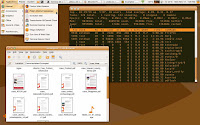
My nice, simple, minimal (?) setup, using the Optiplex, hooked to the ancient Apple Cinema Display.
A bit of a mit of themes (the sleek, fancy and modern Arc) & icons (my beloved & classic GNOME Colors) running on the screenshot.

Labels: , , , , , , , , ,

Sunday, May 11, 2014

The current Lubuntu desktop


The first of many to come, probably...
With a bit of a tweaking, mostly my favorite version of the always lovely GNOME Colors icons.

Labels: , , , , , , , ,

Saturday, August 11, 2012

The current Scientific Linux desktop

Monday, April 09, 2012

The current Ubuntu desktop


Went back to the greys, my beloved Clearlooks & Gnome Colors icons.
A true classic.

Labels: , , , , , , , , ,

Sunday, December 11, 2011

The current Ubuntu desktop


With a little GNOME Colors love, Clearlooks GTK, and of course, the Linux Mint wallpaper from yesterday's tests.

Labels: , , , , , , , ,

Tuesday, July 19, 2011

The current Ubuntu desktop

Wednesday, July 06, 2011

The current Ubuntu desktop

A very nice and softly looking GTK theme called Murrina Chupetin, of course, Metacity is still Clearlooks and Gnome Colors as usual, are the icons.

Labels: , , , , , , , , ,

Monday, July 04, 2011

The current Ubuntu desktop


Nothing much has changed... Still the ole trusty Gnome, Clearlooks & the beloved Gnome Colors icon set.

Labels: , , , , , , , , ,

Thursday, June 16, 2011

The current Ubuntu desktop


Oh man... I'm in love with Clearlooks, Gnome Colors & the Trisquel wallpaper...

Labels: , , , , , , , , ,

Monday, June 13, 2011

The current Ubuntu desktop


Gnome Colors
Clearlooks
And, yes, the Trisquel wallpaper... Clarity, simplicity and beauty.

Labels: , , , , , , , , ,

Saturday, June 11, 2011

The current Ubuntu desktop


The Minimal Desktop, this time, a little bit customized since the first screenshot.
GNOME Colors and Metacity's builtin composite engine on.

Labels: , , , , , , , , , ,

Sunday, June 05, 2011

The current Ubuntu desktop

Wednesday, June 01, 2011

The current Ubuntu desktop


I love Clearlooks.
And Gnome-Colors Brave.
And the Squeeze wallpaper.
But then again, this is nothing new...

Labels: , , , , , , , , ,

Wednesday, May 18, 2011

The current Ubuntu desktop


With a lot of inspiration from the latest Debian, I should say... And lot of help from GNOME Colors as well.

Labels: , , , , , , , , ,

Sunday, March 27, 2011

The current Ubuntu desktop


It is "Back to the Earth and all of its rich browns" this weekend... Ubuntu Style!

To visit all time friends like GNOME Colors, lucky me, I like to keep old versions around, since I couldn't find anywhere the version that I really like of GNOME Colors, the one I posted about here: Jaunty re-installation (4)...

Incidentally, the folks over at Deposit Files have decided to delete the file I uploaded there...

Labels: , , , , , , , ,

Saturday, December 19, 2009

The current Ubuntu desktop

MurrineRounded glory
Metacity composite
GNOME-Colors beauty
Vladstudio wallpaper
Gnome desktop

The classic Ubuntu desktop

Un compressed copy on Image Shack

Labels: , , , , , , , , ,

Friday, September 18, 2009

Jaunty re-installation (4)

And now, the icon set!

My favorite Gnome icons are the one from GNOME Colors, but, the latest releases don't really cut it for me... They have a few icons that are not totally kosher with the whole Ubuntu Browns, IMHO.

So I keep using an older release I kept around, so here it goes, the customized package with just the icon set color I like and the version I like.

GNOME Colors customized package (5 MB)

Using this release requires that you issue this after the install, even tho Iḿ using Jaunty:
sudo rm -f /usr/share/icons/gnome/scalable/places/inode-directory.svg
sudo rm -f /usr/share/icons/gnome/32x32/places/inode-directory.png
sudo rm -f /usr/share/icons/gnome/24x24/places/inode-directory.png
sudo rm -f /usr/share/icons/gnome/22x22/places/inode-directory.png
sudo rm -f /usr/share/icons/gnome/16x16/places/inode-directory.png
sudo rm -f /usr/share/icons/gnome/icon-theme.cache
sudo gtk-update-icon-cache -qf /usr/share/icons/gnome

And logout or reboot.

Labels: , , , , , , , ,

Saturday, May 02, 2009

Window Shopping on a slow Saturday


Being window shopping today, mostly Emerald themes, looking for another theme to, perhaps not replace my beloved Human Tiger, but to give it a little of rest.

These two are the defacto install on my Gnome setups, they look kick ass on any Ubuntu setup:

- GNOME-colors 3.1
The greatest and meanest Gnome icon set for Ubuntu, IMHO.

- Human Murrina
Yeah, it might be "old", but I love it, to me it should be Gnome's default theme.

And these ones I have researched, installed on Tango and tested:

- Belgrade OS X theme
- New Clearlooks Orange (Ubuntu) 1
- Ubuntu Human soft 1.1
- Ubuntu Dust theme 1.0
- Humanized 0.1
- Human Leopard 1.1

But none of them convinced me...
The best one was 'Ubuntu Human Soft', but didn do the thing for me, and in the end, I went back home to my beloved Human Tiger.

Labels: , , , , , , ,

Monday, November 17, 2008

The current Ubuntu desktop

Time for a lighter theme, not that I don't like the DarkRoom theme anymore... but I want to try another thing, in this case, the Human Murrina GTK theme, and the GNOME colors icon set.

To begin with, download it to your ~/Desktop/.
The issue the "Extract here" to the downloaded "GNOME_Colors_by_perfectska04.zip" file, after that, open a Terminal, and then:
cd ~/Desktop/GNOME_Colors_by_perfectska04/

Then extract the "gnome-human.tgz" package, and then copy it to the directory '/usr/share/icons/', that is:
sudo cp -R gnome-human /usr/share/icons/

After that, there are a couple of steps more involved:
cd /usr/lib/firefox-3.0.3/chrome/icons/default
sudo cp -R default default.ORIG
sudo cp -R ~/Desktop/GNOME_Colors_by_perfectska04/Extras/gnome-human Extras/usr/lib/firefox-3.0.3/chrome/icons/default/ /usr/lib/firefox-3.0.3/chrome/icons/default/

cd /usr/lib/firefox-3.0.3/
sudo cp -R icons icons.ORIGs
sudo cp -R ~/Desktop/GNOME_Colors_by_perfectska04/Extras/gnome-human Extras/usr/lib/firefox-3.0.3/icons/ /usr/lib/firefox-3.0.3/icons/

Then, to finish everything, it is necessary to execute this commands:
 
sudo rm -f /usr/share/icons/gnome/scalable/places/inode-directory.svg
sudo rm -f /usr/share/icons/gnome/32x32/places/inode-directory.png
sudo rm -f /usr/share/icons/gnome/24x24/places/inode-directory.png
sudo rm -f /usr/share/icons/gnome/22x22/places/inode-directory.png
sudo rm -f /usr/share/icons/gnome/16x16/places/inode-directory.png
sudo rm -f /usr/share/icons/gnome/icon-theme.cache
sudo gtk-update-icon-cache -qf /usr/share/icons/gnome

And then logout or reboot to get all the changes done.

Labels: , , , , , , , ,